
Head Office control
The Super Admin manages branches, users, permissions, warehouse stock, purchases and consolidated reports.

📦Distribution & Inventory Management
Distribution and inventory management software for wholesalers, distributors, suppliers and multi-branch businesses. Manage centralised stock, batches and expiry, purchasing, branch stock requests, pricing, route-wise distribution, billing and collections through a Head Office dashboard, branch dashboards, a delivery personnel mobile app and WhatsApp.
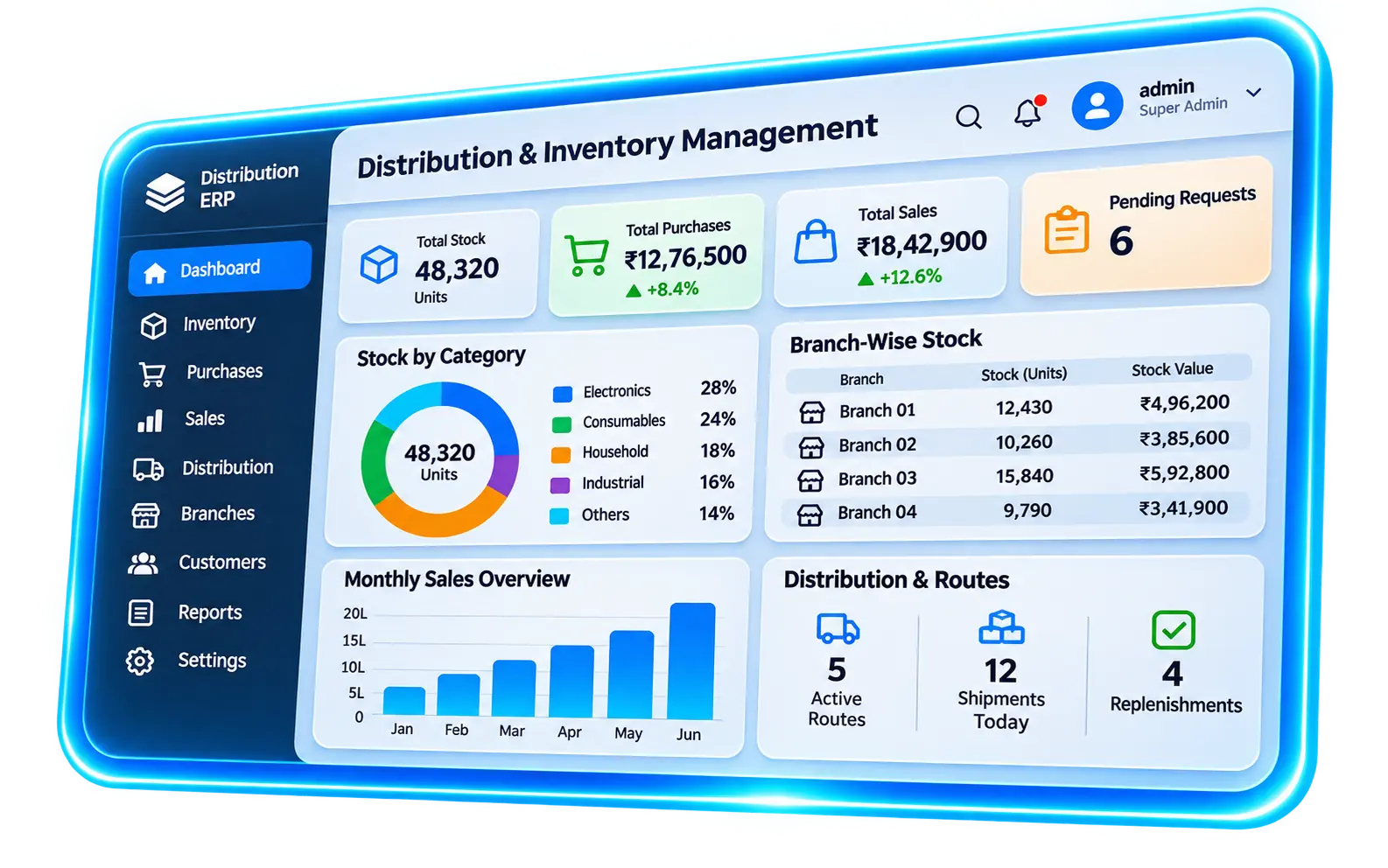
Connected distribution network
The Head Office, main warehouse, branches, delivery routes and customers all work from the same records. Watch how stock, requests and bills move through the business.
The Super Admin manages branches, users, permissions, warehouse stock, purchases and consolidated reports.
Each Branch Admin sees their own stock, batches, expiry dates and prices, and raises stock requests when levels run low.
Delivery personnel bill on the spot, and customers order and check accounts on WhatsApp with nothing to install.
Inside the platform
Scroll through the back-office modules that keep inventory, purchases, billing and credit in step across every location.
Maintain control across the Head Office, main warehouse and every branch. Product codes, categories, prices and available quantities stay in one place, with a consolidated view and branch-wise detail.
| Product | HO | Br. A | Br. B | Br. C |
|---|---|---|---|---|
| Cola 2L | 1,240 | 180 | 95 | 12 low |
| Biscuits | 860 | 210 | 140 | 96 |
| Cooking oil 1L | 540 | 28 low | 120 | 88 |
| Tea 500g | 720 | 160 | 130 | 75 |
Record supplier purchases with quantities, prices, batch numbers and manufacturing and expiry dates. Inventory updates as soon as stock is received, and supplier history stays organised.
| Item | Batch | Expiry | Qty |
|---|---|---|---|
| Cola 2L | B-2104 | Feb 27 | 600 |
| Biscuits | B-1982 | Jan 27 | 400 |
| Tea 500g | B-2110 | Aug 27 | 300 |
Generate bills for cash or credit sales and manage quotations. The applicable price is applied automatically, and the finished invoice can be shared with the customer on WhatsApp.
| Item | Qty | Rate | Amount |
|---|---|---|---|
| Cola 2L | 20 | ₹96 | ₹1,920 |
| Biscuits | 5 | ₹640 | ₹3,200 |
| Cooking oil 1L | 12 | ₹157 | ₹1,884 |
Customers can pay now or buy on credit. Pending amounts stay in each customer account, and payments can be recorded at the branch or by delivery personnel during visits.
Record damaged, expired and unusable stock, log customer returns against their transactions, and correct stock when a physical count differs from the system.
Branch replenishment
Branches raise requests from their own dashboard. The Head Office reviews, dispatches and tracks each one until the branch confirms receipt.
Price management
Update selling prices whenever the market moves. Prices are stored by date, so a bill entered late still uses the price that applied on the day. Drag the date to see how it works.
| Product | Price | vs previous day |
|---|
Batch and expiry management
Keep batch records with received quantities, manufacturing dates and expiry dates. Branch Admins see the batches at their location, and the Head Office sees availability across every branch.
Route-wise distribution
Delivery personnel do more than drop off stock. They deliver to branches, add products on the spot and sell to other stores, businesses and individuals along the route, even when those customers were never on the original schedule.


View assigned routes, branch details and allocated products, then record the quantities delivered.
If a branch needs more than it requested, add the products, pick the price and generate an updated bill.
Sell to stores, businesses and individuals who are not registered branches, then share the invoice on WhatsApp.
Monitor movement along routes, visited branches and customers, and delivery progress from the dashboard.
Compare allocated, delivered, additionally sold and remaining stock for every route, with total route-wise collections alongside.
WhatsApp services
Customers do not need to install anything. An integrated chatbot takes order and quotation requests, shares bills and reminders, and gives authorised managers supported reports without opening the dashboard.
Customers browse supported products, submit quantities and start an order or quotation request.
Purchase history, returns, pending credit and outstanding balances on request.
Bills, direct route sale invoices, payment reminders and balance alerts are sent automatically.
Authorised users can request sales, inventory, distribution and outstanding information.
Multi-branch administration
The Super Admin governs the whole business. Each branch runs from its own dashboard, and roles decide which modules every employee can open.
Branches, warehouse, users, permissions and consolidated reports.
Branch stock, requests, sales, billing and daily activities.
Only the modules and operations assigned to their role.
Reports and analytics
Five report families give management a clear view of stock movement, branch performance, field sales and cash collection.
Yes. The Super Admin controls the Head Office, main warehouse, branches and users, while each Branch Admin works from a dedicated dashboard for their own branch.
A Branch Admin submits a stock request from the branch dashboard. The Head Office reviews it, can approve, modify or reject quantities, dispatches the stock and tracks it until the branch receives it.
Yes. Route agents can deliver to branches and also sell available stock to other stores, businesses and individual customers along the route, then generate the bill on the mobile app and share it on WhatsApp.
Yes. Batch numbers, quantities, manufacturing and expiry dates can be recorded, and branches and the Head Office can see batches approaching expiry.
Yes. Pricing is date-based, so backdated transactions use the price applicable on the selected date.
No. Customers use the WhatsApp chatbot to place order or quotation requests, view account details and purchase history, and receive bills and payment reminders.
Request a product demonstration and we will show the modules that matter for your branches, routes and customers.
Bring purchasing, inventory, branch management, billing, distribution and customer management together in one integrated solution.